An organization created with the United Kingdom as its country is set up the way a British business expects: pounds sterling, an April year end, a British chart of accounts, HM Revenue & Customs as its VAT agency, and day-first dates on everything it prints. This page covers what is different from a Canadian or US organization. Everything else — invoicing, bills, banking, reports — works exactly as the rest of this documentation describes.
Set up a UK organization
Choose United Kingdom as the Country on the first step of the setup wizard, then pick your Nation: England, Scotland, Wales, Northern Ireland, or the Isle of Man. The base currency fills in as pounds sterling and the fiscal year starts in April; change the month to your company’s accounting reference date if it differs. The Timezone comes from your browser rather than the country, so check that it reads London, Dublin, Lisbon. The country cannot be changed once the organization exists, so pick it carefully.
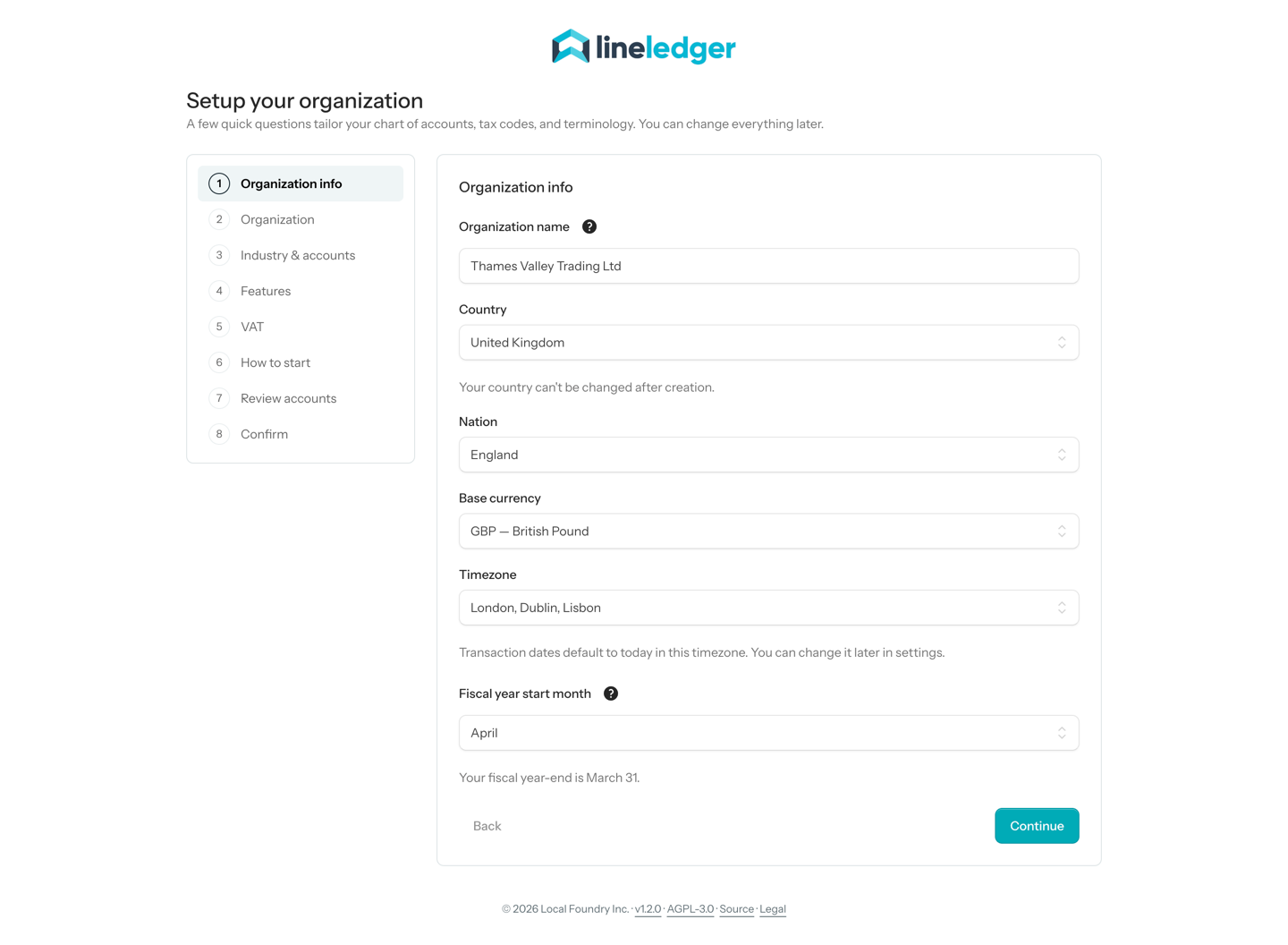
- The organization types use UK names: Sole trader, Partnership / LLP, Limited company (Ltd), Non-profit, and Other / None. Non-profit then asks for an Unincorporated association or a Non-profit corporation. Registered charity is a Canadian (CRA) structure and is not offered, so a UK charity can keep its books as a non-profit but cannot issue Gift Aid or other donation receipts from LineLedger.
- A limited company or an LLP is asked for its Company number — the Companies House number, or the Isle of Man Companies Registry number. It is optional, and you can add or change it later on the organization’s edit page. A number of up to seven digits is padded with leading zeros to the usual eight (12345 becomes 00012345); a number with a prefix, such as SC123456, is kept as typed, in capitals and without spaces.
- The sales tax step asks Are you VAT-registered? Switch on I’m VAT-registered and charge VAT to add a VAT Payable account, HM Revenue & Customs as your VAT agency, and four tax codes: VAT (Standard VAT, 20%), VAT-R (Reduced VAT, 5%), ZR (Zero-rated, 0%), and EX (Exempt). Leave it off if you are not registered.
- Equity follows the organization type — a limited company gets 3100 Ordinary Shares — and the bank account is named Current Account. The starting payment methods are Cash, Cheque, BACS, Faster Payments, Direct Debit, Wire, and Credit card.
Note — The Isle of Man. Isle of Man businesses are inside the UK VAT area, but their VAT is run by the Isle of Man Customs and Excise Division. Pick Isle of Man as the Nation and the VAT agency is named Isle of Man Customs and Excise instead of HM Revenue & Customs. Moving an existing organization onto or off the island in its settings renames the agency to match, unless you have renamed it yourself.
Your VAT number
The VAT registration number is entered on the wizard’s VAT step or later under Settings → Invoices, and is checked for the shape HMRC issues: GB followed by 9 digits, or 12 for a branch or group member, or GBGD or GBHA followed by 3 digits for a government department or health authority. Northern Ireland traders can enter an XI number. Spaces, dots, and dashes are dropped and a bare 9- or 12-digit number gets its GB prefix, so 123 4567 89 is stored as GB123456789. A number that does not fit is refused when you save.
Invoices and other forms
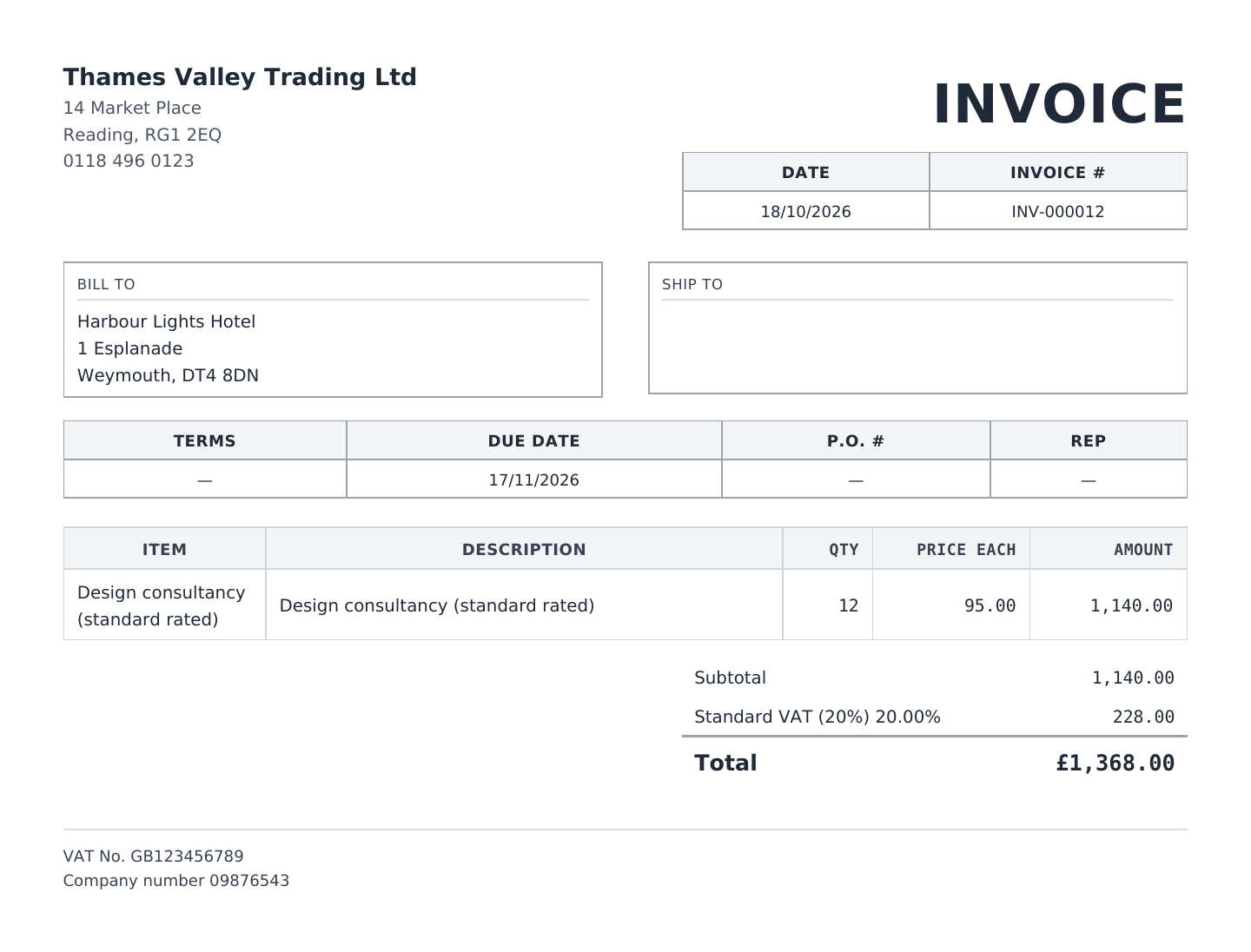
A UK organization’s printed forms — invoices, estimates, credit memos, sales orders, receipts, statements, bills, purchase orders, vendor credits, and bill payments — write dates day first, so 04/03/2026 is 4 March, and show amounts with the document’s own currency symbol: £ on a sterling invoice, € on one in euros. The footer prints the VAT number as VAT No. (when Show tax number on invoices is on in Settings → Invoices) and, beneath it, the Company number whenever one is on file.
The VAT Return report
Reports → All Reports → VAT Return (under Sales Tax) works out the nine boxes of an HMRC VAT return from your books. It opens on the last complete calendar quarter; the Quarter menu offers Last quarter and This quarter, and the Start and End dates take any other period — type them in if your VAT quarters do not follow the calendar. With more than one VAT agency, an Agency list picks which one. CSV downloads the boxes.
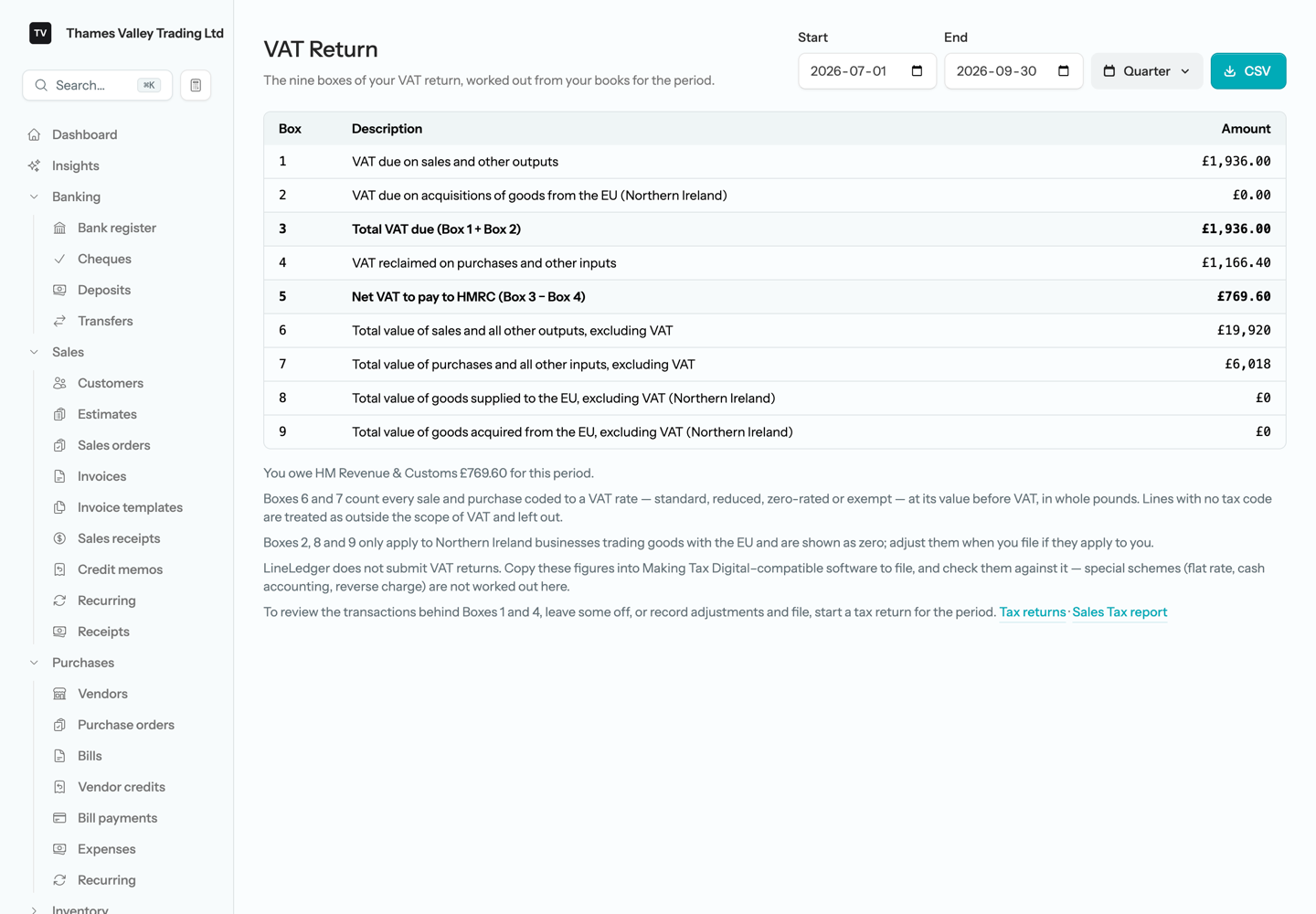
- Box 1, VAT due on sales, and Box 4, VAT reclaimed on purchases, are the same figures a tax return for the period shows as Collected and Paid (Input VAT). They come from the VAT Payable account in the ledger, so VAT keyed in a journal entry counts too.
- Box 3 is Box 1 plus Box 2, and Box 5 is Box 3 less Box 4. When Box 4 is larger, Box 5 reads Net VAT to be reclaimed from HMRC and the line beneath the table says the agency owes you.
- Box 6 is the value before VAT of your sales — invoices and sales receipts less credit memos — and Box 7 of your purchases — bills, expenses, and cheques less vendor credits. Only lines coded to one of the agency’s tax codes count, including zero-rated and exempt ones; a line with no tax code is treated as outside the scope of VAT and left out, as are opening-balance documents. Amounts are in pounds, converted at each document’s own rate, with the pence dropped as HMRC asks.
- Boxes 2, 8, and 9 cover Northern Ireland’s trade in goods with the EU, which the books do not separate, so they always show zero. Fill them in when you file if they apply to you.
- A voided document counts where the ledger puts it: in its own period, and again — taken off — in the period of its reversing entry.
Heads up — LineLedger does not file with HMRC. Nothing is submitted to HMRC. Copy the boxes into Making Tax Digital–compatible software to file, and check them there. Special schemes — the Flat Rate Scheme, cash accounting, and the reverse charge — are not worked out.
Filing a UK VAT return
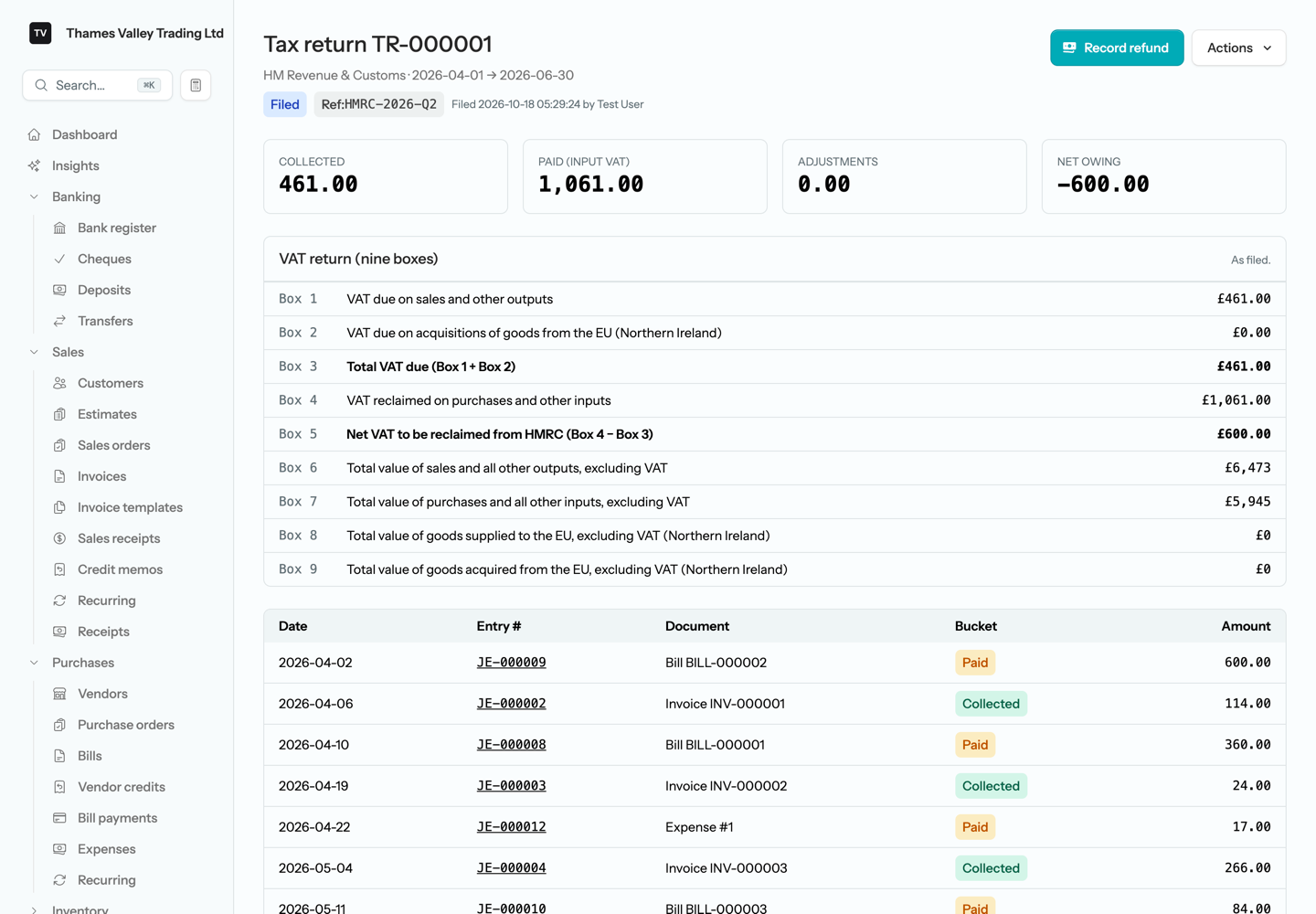
To review the transactions behind the boxes, leave some out, or add adjustments, file a tax return for the quarter as described in Tax returns. A UK return’s page adds a VAT return (nine boxes) panel under the tiles. On a draft it is worked out live and follows every line you leave out — a document left out comes off Boxes 6 and 7 as well as Box 1 or Box 4. An Other adjustment has no box of its own, so it goes where HMRC puts small corrections: an increase in what you owe in Box 1, a decrease in Box 4. Box 5 therefore always equals the return’s Net owing.
Filing freezes the nine boxes with the rest of the snapshot, and the panel then reads As filed. They no longer change if a document in the period is edited later, so the return keeps showing what you sent HMRC.
What is not available for UK organizations
- Payroll. The payroll engine is built on Canadian rules, so the Payroll switch is not offered; run UK payroll in other software and post its totals with a journal entry.
- Gift Aid and charity donation receipts — see Set up a UK organization above.
- Making Tax Digital submission, and the VAT special schemes.
- Settings → Tax & filing and the CRA income-tax reports, which are for Canadian organizations.
Running your own LineLedger server for UK customers? APP_REGION and the .uk host settings are covered on Self-hosting & upgrades.